
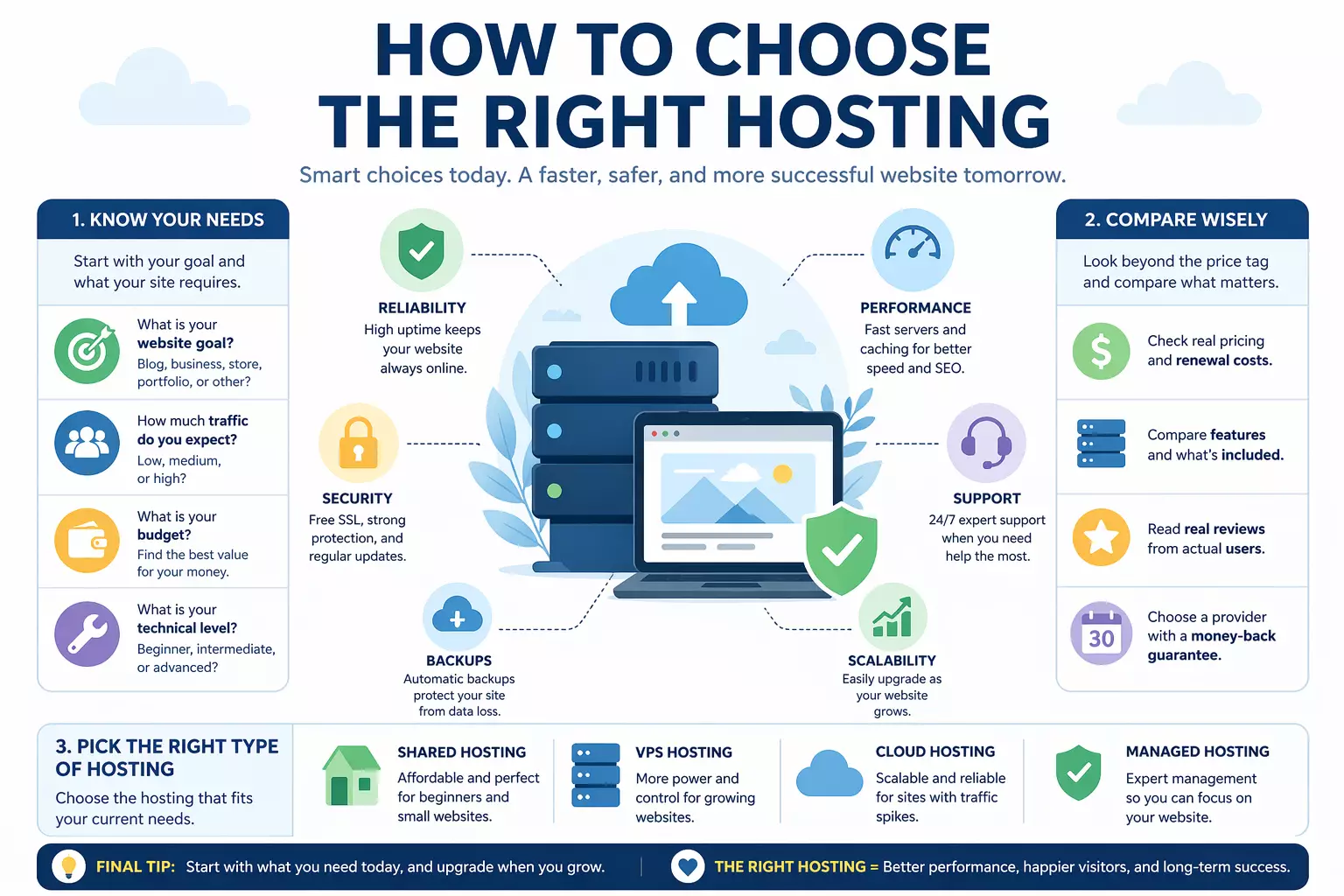
Choosing the right web hosting is one of the most important steps to start a fast, secure, and successful website. The good news is you don’t need to be a tech expert.
Below you’ll find clear advice on types of hosting, key features, real costs, and beginner tips to help you pick the perfect hosting plan for your exact needs.
Whether you want to start a blog, build a business site, launch an online store, create a portfolio, or switch providers, this guide has you covered.
This site contains affiliate links. I can get a commission on qualified purchases.
What you need to start a Website: Domain Name, Hosting, and Software
Starting your first website can feel overwhelming, but it only requires three essential pieces: a domain name, web hosting, and the website software itself.
The domain name is your site’s unique address (like http://www.yourbusiness.com) that visitors type into their browser.
Web hosting provides the secure online server space where all your website files are stored and kept online 24/7. Hosting companies make the process beginner-friendly by bundling all three components into one simple plan.
In fact, most web hosting plans include a free domain name for the first year, which helps you save money right away.
This all-in-one approach means you can register your domain, get hosting, and launch your site in minutes without juggling multiple providers.You are not required to buy everything from the same company. Many people already own a domain name and simply purchase a hosting plan to connect it later.
Pointing your domain to new hosting is straightforward using DNS settings and usually takes just a few clicks. Understanding these options helps you decide whether a bundled plan or separate services best fit your budget and needs.
Whether you choose an all-in-one package or mix and match, reliable web hosting remains the foundation that keeps your website fast, secure, and always available to visitors.
Website Software Explained: From HTML Coding to Easy Drag-and-Drop Builders
In the early days of the internet, building a website required writing everything in plain HTML – the core formatting language of the web – then manually uploading those files to your hosting server.
You can still create sites this way today if you enjoy coding, but it’s rarely necessary for most people.
Modern website software has completely changed the game, letting everyday users build professional-looking sites without writing a single line of code. Instead of coding, you simply drag and drop blocks or sections to arrange text, images, videos, and pages however you like. This block-based approach makes website creation fast, visual, and accessible to complete beginners. No technical background is required – just creativity and a clear vision for your site.
WordPress.org is by far the most popular and widely used website software in the world. It powers 43.5% of all websites on the internet, making it the foundation for more sites than any other platform. Originally launched in 2003 by co-founders Matt Mullenweg and Mike Little as a simple blogging tool (a fork of an earlier project called b2/cafelog), WordPress has grown into a powerful, free, open-source content management system (CMS). The software is regularly updated with new features, security improvements, and performance enhancements, keeping millions of sites safe and modern.
Many web hosting companies now offer managed WordPress hosting, where they automatically handle all updates, security patches, backups, and maintenance for you. This means you never have to worry about the technical side – you can simply focus on creating great content.You’re not locked into WordPress, of course.
Depending on your hosting plan, you can install other popular website builders or software that best matches your specific goals. The key is choosing software that feels comfortable and gives you the features you need without unnecessary complexity.
WordPress.org gives you the full open-source version to install on any hosting account, offering maximum flexibility and control.
WordPress.com, on the other hand, is the fully managed service created by Automattic – the respected company founded by WordPress co-founder Matt Mullenweg. It uses the same powerful WordPress software but handles all hosting, security, and updates for you, making it an excellent, reliable choice for bloggers, small businesses, and professional sites that want simplicity without sacrificing quality.
Different Types of Web Hosting: Shared, VPS, Cloud, and More
Understanding the different types of web hosting is one of the smartest first steps when launching your website. Each type offers a different balance of cost, performance, security, and control, and choosing the wrong one can slow your site down or force you to move everything later.
The good news? You can start simple and upgrade as your traffic and needs grow – without starting over from scratch.
Shared hosting is the most affordable and beginner-friendly option available.
Your website files share the same physical server with dozens or hundreds of other small sites, just like renting an apartment in a big building.
It’s ideal for new blogs, portfolios, small business sites, or hobby projects that expect fewer than 50,000 visitors per month – and most hosts make setup incredibly easy with one-click WordPress installation.
As your audience grows and you need more resources, you can upgrade to VPS hosting (Virtual Private Server). With VPS, you get a dedicated slice of a server with guaranteed RAM, CPU, and storage – so your site stays fast even during traffic spikes.
It’s a popular middle step for growing websites that want more speed and customization without the full cost of a private server.
Cloud hosting takes things further by spreading your site across a network of connected servers. If one server gets busy, traffic automatically shifts to another, giving you excellent reliability and the ability to scale resources instantly.
This type is perfect for online stores, news sites, or any project expecting sudden traffic surges or steady long-term growth.
For maximum power and complete control, dedicated hosting gives you an entire physical server all to yourself. You decide exactly how the server is configured, which is great for large e-commerce stores, membership sites, or applications that handle very high traffic.
While it’s more expensive, it delivers the fastest speeds, strongest security, and full root access.
Managed WordPress hosting is a specialized type built exclusively around WordPress.org. The hosting company automatically handles updates, security patches, daily backups, caching, and performance tuning — so you never have to touch the technical side. It’s the easiest way for beginners (and busy professionals) to run a fast, secure, and always-up-to-date WordPress site without learning server management.
Choosing the right type of web hosting today saves you time, money, and frustration tomorrow. Start with shared or managed WordPress if you’re new, then scale up as your site grows. The best hosts make upgrading seamless, so your website can evolve naturally without ever going offline.
How to Choose the Best Web Hosting Plan for Beginners
Choosing the right web hosting plan is one of the most important decisions you’ll make when launching a website – it affects everything from speed and security to long-term costs and ease of use.
For complete beginners, the process can feel overwhelming with so many options and technical terms, but focusing on a handful of proven features makes the decision much clearer and smarter. The goal is to find a host that grows with your site, keeps it running smoothly, and gives you peace of mind from day one.
The top features every beginner should look for are a 99.9% uptime guarantee, fast server speeds, a free SSL certificate (to enable secure https://), automatic daily backups, and 24/7 customer support.
Uptime means your website stays online almost all the time — even a few hours of downtime per year can cost you visitors and Google rankings.
Fast server speed (thanks to SSD storage, global data centers, and built-in caching) ensures your pages load in under 2–3 seconds, which keeps visitors happy and improves search engine results.
A free SSL certificate is now essential for any new site because it encrypts data and shows the padlock in browsers; Google actually prefers secure sites in its rankings.
Daily automatic backups act as insurance: if anything goes wrong (a plugin conflict, accidental delete, or hack), you can restore your entire website in minutes. And 24/7 customer support via live chat or phone is crucial when you’re just starting out – real humans who answer quickly can save you hours of frustration. Price matters, but the cheapest web hosting plan is rarely the best long-term choice.
Always check the renewal price after the first 12–36 months (many hosts double or triple the rate), read genuine user reviews on independent sites, and understand exactly what’s included versus what costs extra.
Look for added value like a free domain name, easy one-click WordPress installer, free website migration, email accounts, and a money-back guarantee (usually 30–60 days) so you can test risk-free.
The best web hosting for beginners also offers a simple control panel (like cPanel or a custom dashboard), easy scalability so you can upgrade without moving sites, and beginner-friendly extras such as a drag-and-drop website builder.
By evaluating these practical features instead of just the lowest price, you avoid common pitfalls like slow loading times, poor support, or surprise fees later.
A reliable host becomes a true partner that saves you time, money, and headaches while helping your new website succeed and grow naturally.
How Much Does Web Hosting Really Cost? Clear Pricing Guide
Web hosting prices can vary dramatically – from just a few dollars per month for basic plans all the way up to hundreds for enterprise-level solutions – depending on the type of hosting, included features, and performance level you need.
For most beginners, the sweet spot is shared hosting or managed WordPress hosting priced between $3 and $12 per month, especially during the first-year promotional offers that almost always include a free domain name.
These introductory discounts make getting started incredibly affordable, but they are designed to attract new customers, so smart planning is essential.
The biggest mistake new website owners make is focusing only on the low promotional price. Most hosts offer big discounts for the first 12 to 36 months, but the renewal price can jump 50–200% afterward – sometimes turning a $4/month plan into $12–$15/month or more.
Always calculate the real long-term cost by checking both the intro rate and the renewal rate before you sign up. Don’t forget to factor in everything your site will actually need as it grows.
Extras like professional email accounts, a drag-and-drop website builder, e-commerce tools (shopping cart, payment processing), CDN access, or extra storage can add to the monthly bill if they’re not included.
Quality hosts often bundle these features for free in higher-tier plans, saving you money compared to buying them separately.
Transparent pricing and a generous money-back guarantee (usually 30 to 60 days) are two of the best signs of a trustworthy provider. This risk-free period lets you test speed, support, and reliability with your actual website before committing long-term.
Understanding the true total cost – not just the headline price – helps you choose a web hosting plan that fits your budget today while supporting smooth growth tomorrow. A smart investment in the right web hosting plan pays for itself many times over through better performance, fewer problems, and stronger search engine rankings.
By comparing total first-year value and realistic renewal costs instead of chasing the absolute cheapest option, beginners avoid expensive surprises and set their website up for long-term success.
The best plans deliver professional results without breaking the bank.
I Want to Start a Blog – Which Hosting Is Best for Me?
If you’re starting a blog, you need web hosting that is simple, affordable, and built for regular content updates without technical headaches.
Bloggers typically have low to medium traffic at the beginning, so you don’t need expensive high-traffic plans – focus instead on fast loading speeds, automatic backups, and easy tools for writing and publishing posts.
Managed WordPress hosting is usually the smartest choice because it handles all updates and security for you, letting you concentrate on creating great content.A reliable host should also include a free SSL certificate, professional email, and one-click WordPress installation so you can launch in minutes.
This keeps your blog secure, professional, and search-engine friendly from day one.
Many new bloggers find that starting with a beginner-friendly plan and upgrading only when traffic grows is the most cost-effective path.
Recommended options for bloggers:
- WordPress.com – the easiest all-in-one solution for new blogs
Get started with WordPress.com - Bluehost – affordable, beginner-friendly, and officially recommended by WordPress
Get started with Bluehost
I Want to Launch My First Website – Which Hosting Is Best for Me?
When you’re building your very first website, the ideal web hosting is beginner-friendly, affordable, and includes everything you need to get online quickly.
You probably won’t have high traffic yet, so shared or managed WordPress hosting gives you plenty of speed and storage without overpaying for resources you won’t use.
Look for hosts with a simple control panel, free domain for the first year, and 24/7 support in case you get stuck.The focus should be on reliability and ease of use rather than advanced features.
This way you can experiment, learn, and grow your site without stress or surprise costs. Starting small and scaling up later is the smartest strategy for complete beginners.
Recommended options for first-time websites:
- Bluehost – perfect entry-level choice with free domain and one-click setup
Get started with Bluehost - WordPress.com – hassle-free managed hosting so you can focus on your site
Get started with WordPress.com
I Want to Build a Business Website – Which Hosting Is Best for Me?
For a business website, you need web hosting that delivers professionalism, reliability, and room to grow as your company expands.
Business sites often require strong uptime, fast loading times for better customer experience, and features like multiple email accounts and easy integration with marketing tools.
Shared hosting can work at the start, but many small businesses quickly benefit from VPS or managed WordPress hosting for better performance and security.Choose a host that offers free SSL certificates, daily backups, and excellent support so your site stays trustworthy and always online.
This builds customer confidence and supports your brand image right from launch. Investing a little more now in a scalable plan prevents costly downtime or migrations later.
Recommended options for business websites:
- Bluehost – reliable and scalable for growing businesses
Get started with Bluehost - Liquid Web – premium performance and expert support when you need more power
Get started with Liquid Web
I Want to Launch an Online Store – Which Hosting Is Best for Me?
Running an online store requires web hosting that can handle e-commerce tools, secure payments, and traffic spikes during sales. You’ll want fast servers, excellent security (including free SSL), and compatibility with platforms like WooCommerce or Shopify integrations.
Cloud hosting or higher-tier managed WordPress hosting is often the best fit because it scales automatically and keeps your store loading quickly even when customers are browsing.Prioritize hosts that offer built-in caching, DDoS protection, and easy one-click backups to protect your products and customer data. This ensures a smooth shopping experience and helps your store rank better in search results. Starting with the right plan saves you from performance issues that can hurt sales.
Recommended options for online stores:
- Shopify – built specifically for e-commerce with everything included
Get started with Shopify - Cloudways – flexible cloud hosting that scales with your sales
Get started with Cloudways
I Want to Create a Portfolio Website – Which Hosting Is Best for Me?
A portfolio website is all about showcasing your work beautifully, so you need web hosting that emphasizes speed, visual performance, and simplicity.
Portfolios usually have lower traffic but still require fast image loading and a clean, professional design – shared or managed WordPress hosting works perfectly for most creatives.
Focus on hosts with strong CDN support, free SSL, and easy drag-and-drop builders so your projects look their best on any device.Security and reliable uptime are still important to protect your images and client information.
This type of site benefits from a lightweight, fast plan rather than heavy resources you won’t need. The result is a polished online presence that impresses visitors without complicated maintenance.
Recommended options for portfolio websites:
- WordPress.com – beautiful themes and super-simple design tools
Get started with WordPress.com - Bluehost – fast loading and great for visual sites
Get started with Bluehost
I Want to Switch Hosting Providers – Which Hosting Is Best for Me?
If you’re switching hosting providers, you need a host that makes migration easy and improves on your current setup. Look for companies that offer free website migration services, so your site, files, and database move without downtime or data loss.
Managed WordPress hosting or VPS plans often provide the best upgrade in speed, security, and support compared to basic shared hosting you may have outgrown.Check for strong uptime guarantees, better performance features, and transparent renewal pricing to avoid future surprises. A smooth switch can instantly boost your site’s speed and reliability. The right new host will feel like an upgrade instead of just another change.
Recommended options when switching:
- Cloudways – excellent migration support and high-performance cloud hosting
Get started with Cloudways - Liquid Web – premium support and fast, reliable servers
Get started with Liquid Web
Final Advice: Choose the Right Web Hosting Plan for Your Actual Needs
The smartest way to pick web hosting is to pay only for the resources and features you will actually use right now – not for every possible upgrade or “premium” extra.
It’s easy to fall into fear of missing out and choose an expensive plan loaded with tools you may never need, but overspending at the start often leads to wasted money and unnecessary complexity.
Focus on matching the plan to your real goals so you get excellent value without overpaying. If you are a beginner launching your first website, you probably won’t have massive traffic immediately. Paying for a high-end plan built for 200,000 visitors per month makes no sense when you expect only a few thousand – start simple with shared or managed WordPress hosting and upgrade later when your site actually grows. This practical approach keeps costs low while still delivering fast, reliable performance from day one.
On the other hand, if you have professional needs – such as an online store, membership site, or high-traffic blog – choosing a cheap, under-powered plan can hurt your business. In that case, it’s wiser to buy a little more resources than you need today so your hosting is future-proof and can handle growth without slowdowns or sudden migrations. A slightly higher investment now prevents headaches and lost revenue later.
By following this balanced advice, you’ll avoid the two most common beginner mistakes: overspending on features you don’t need or underspending and limiting your site’s potential.








Leave a Reply